Darkavich's Daily Ramblings Ramblings of a Mad Sys-Admin

March 23, 2010

Where is customer service today?

Filed under: Items in the Pensieve,Muggle Tech — Darkavich @ 3:34 pm

I started writing this blog posting aggravated and pissed off at TiVo and with full intention of canceling my service and switching to TWC’s DVR service today.

My problems started 14 months ago. I obtained a TiVo tuner adapter to support SDV-TV. I picked up the adapter so that I could watch the season finally of Battlestar Galactica on SciFi-HD (excuse me… SyFy-HD). I was disappointed with the recording of the show. It turns out that Time Warner cable didn’t broadcast the show in HD, but up-converted the standard definition show instead.

After about a month, I started having problems with channels not coming in or recording the shows. After about nine months of troubleshooting, I realized that every SDV-TV channel was the problem. Sometimes they would come in and sometimes they would not. I figured that I had a bad adapter, so I picked up a second one and swapped it out. The problem did not go away.

I then spent the next three months with both TWC and TiVo pointing the finger at each other. We spent/wasted time on swapping out cables, connectors, and adding/removing boosters. Fortunately, I have some contacts over at TWC and was able to get my ticket escalated up to the SDV-TV guru’s. They came out to my house and was able to determine that the adapter was talking properly to the head-end and that with a 99.99% confidence proved the problem was not the cable or the plant.

With this knowledge, I contacted TiVo back and passed on all this information. The customer no-service rep that I talked to told me that there was no way the problem could be the TiVo and it must be my adapter or the Cable Cards in the unit. I explained that both of these components had been replaced at least twice, but he insisted that it has to be the problem.

I called my contact back at TWC, who said there is no way it could be the problem as they are binary devices. They either work or they don’t. We agreed to do the swap out knowing full well it would not fix the problem.

I was also having lockup problems with my TiVo while scrolling through the guide or watching recorded shows. I decided to open a second ticket on this, hoping they might decide to just replace the unit. The tech I spoke to was another no-service rep. He told me to run a Kickstart 57 (disk-check) that would run a minimum of three hours on my unit. I decided to do it and in the first twenty minutes the box rebooted. Well short of the three hours.

I called TiVo back and got a VERY good rep this time. He basically told me the other guy was an idiot 😉 and that a KS57 is a last resort and I should have done a different test, less chance of loosing shows. I explained all of my problems for the last 14 months to him. It’s important to know the entire story. Once he had all of the data, he was in agreement with me, that there was no issue with the cable cards and the problem was one of three things. 1) Tuner Adapter 2) TiVo unit or 3) TiVo firmware.

We agreed to only swap out the TA and then call back with the results. I did so, and let them know the problem did not go away. I called back last Thursday and told them this. They then approved a replacement of my TiVo. They then told me there would be a charge for this. They said they had to charge $147 for a refurbished unit. I tried to explain to them that I was unwilling to pay any more money to fix a problem that they refused to admit to while the unit was under warranty and that I would need a no-cost unit or I would be canceling my service on ALL my TiVo’s and switching to TWC’s DVR or AT&T’s Uverse.

The service rep this time said he was not authorized to charge less than $79 for the replacement (funny how it went to retail price to 1/2 all of a sudden). I still refused and asked to be transferred to customer retention. I was transferred to a woman that I had to explain the very long story to again. I then explained that as a long time customer, I should not have to pay to fix a problem they have had since I bought the unit. She then told me she could offer me a discount on an upgrade to the series 4 unit.

I was very confused. I asked her… “So the replacement unit that tech support was going to offer me wasn’t even a replacement series 3-HD but a series 4 unit?” She said “yes”. How pissed would I have been to have received a less-featured unit if I took that deal. I then explained that I was unwilling to pay anything to fix this problem and I would think they would be willing to wave the fee for a S3-HD unit to keep me as a customer and paying them $25/month in service fees.

After about an hour, she finally received approval from her supervisors to swap out my S3-HD for free. She processed my order and told me I would have the RMA information in the next 24 hours. I was happy, or so I thought.

On Friday (last week), I had not received anything yet. I contacted TiVo support and was told that the RMA had never been processed and I would have to call in and speak to the customer service reps. I waited until Monday, as I didn’t want to ruin my weekend. On Monday, I called and talked to the customer no-service folks again and was told that indeed the RMA had never been processed, this took over 90 minutes for him to tell me this. I was then transferred to another no-service department and told that he was unable to process the RMA without a supervisor. He would put me on hold for 1-2 minutes so he could get one. 40 minutes later, I could not wait any longer. I had to go to class, and had no way to get the rep back on the phone. I finally just hung up.

Today, I called back and got the worse rep in the world. And I have had some very bad ones, so this is saying a lot. I tried to explain the situation to this person and he wasn’t listening to me. I finally ask him to transfer me to the original rep I talked to on Thursday so I didn’t have to go through this all again. This fool, had the nerve to tell me it was my fault why this hadn’t been processed. I about lost it with him and asked to be transferred to his supervisor. At this point he refused, he told me that he would not transfer me. I asked him over five times to transfer me… I wanted to make sure that “if” they were recording this conversation they would know he refused several times.

I finally just hung up on him and called back to cancel all my service. I was transferred to account services and talked with another GOOD service rep. Her name was Brady. Her first question to me was “How are you today?”… Well she asked 😉 I explained I was very frustrated and I was calling to cancel all of my service unless she could help me (ONE LAST CHANCE)…

*** Editor footnote: Those who know me, know I have a very short fuse and less patience when it comes to service providers that don’t listen and I am sure your amazed I lasted this long with TiVo. I was willing to put up with this, because they truly have the best product and I really wanted to know the cause of this SDV-TV issue as does TimeWarner.

Brady was very sympathetic and apologetic. She reviewed my ticket and was able to help me. She processed my RMA, gave me an RMA number and got approval for a free return shipping label, which was nice of her. As of right now, I have received my RMA number and my return label.

I am cautiously optimistic that I will have a tracking number tomorrow for my RMA and this new unit will fix my problems…. Check back for updates and here is to hoping we can close the chapter on this very frustrating chapter of technical support issues.

March 10, 2010

Basic Digital Photography class week 3.5

Filed under: Muggle Tech — Darkavich @ 10:57 pm

Tonight we had a field trip. We met down at La Jolla Shores. I have not been here since my college graduation bonfire party in 1989! It was windy and cold!

Tonight we learned about our light meter. I learned how to use spot metering. This will allow me to take a light reading on a specific part of my composition and see how that impacts the exposure and quality of the picture. It was quite interesting how when you take a light reading on something dark, the photo will come out very bright and the opposite when your reading is on something bright.

We took several manual shots (using semi-automatic was causing the camera to try and compensate). We would focus and take a light meter reading and then adjust our shutter speed to get the exposure to zero. Once we set up the shot (most of which required a tripod because of the shutter speeds) we could see how different the shots were based on the spot we took our light meter reading.

We also learned how useless the flash is for anything beyond 12 feet. Our instructor show us how you can take a very long exposure and then put yourself in the shot with a flash and you will show up without blur. That was pretty cool.

I got to use my tripod for the first time, and I need to carry a mini-flashlight with me from now on. I cold not tell if the tripod was level or not. I have levels on it, but could not see it.

The last thing he showed us was how to change when the flash goes off (1st curtain or 2nd curtain). This determines if the flash goes off at the beginning or the end. You might change this if you want blur trails (of say a bike) and then have the subject in light/focus at the end.

I can’t wait to go try out some more sunset/night shots now.

March 8, 2010

Basic Digital Photography class week 3

Filed under: Muggle Tech — Darkavich @ 10:44 pm

Tonight’s class was all about the differences between Aperture Priority and Shutter priority. I still have not received an answer on how to get auto-focus to work with live view. Anyone that knows how to do this on a Canon Xsi, please let me know.

The other stuff we talked about was how to eliminate blur. Blur can happen for two main reasons. The first is camera shake. This is caused by the photographer not being able to hold the camera still during the shot. The best way to eliminate camera shake is to make sure your shutter speed is fast enough. Using the formula

shutter speed = 1/(focal_length * crop factor)

Each camera has it’s own crop factor. Some common crop factors are:

Canon = 1.6
Nikon/Pentax/Sony = 1.5
Olympus = 2.0

So if you were shooting with a focal length of 100mm on a Canon your shutter speed would need to be at least 1/160 so you would have to use 1/250. As you change the focal lengths you run into a problem with not having all of the aperture openings available (Unless you have a fixed aperture lens, which are pricey). So it may not be possible to get the shot with the shutter speed. You may have to increase ISO, which we learned is bad, or put the camera body on a tripod of fixed surface. (remember to turn off image stabilization when you do this).

The other cause of blur is due to motion of the subjects. There are three factors that you have to take into account for this:

1) Speed of the motion of the subject. A slow moving subject will produce less blur than a fast moving subject.
2) The direction of movement of the subject. A subject moving away or towards you will have little blur while a subject moving across your field of vision will have the most blur.
3) The distance from the subject. A subject very close will produce more blur while a subject in the distance will have little or no blur.

One other subject we discussed was Depth of Field. Aperture settings can significantly effect DoF and focus of your subjects are impacted based on focal length and aperture settings. There are a ton of free and for-fee programs that will help you figure out DoF. There are three free ones available on the iTunes store.

My first real mod.

Filed under: Riding the Caran AngRoch — Darkavich @ 4:56 pm

OK, so it’s not really my 1st, but my third. The 1st modification was to add a louder horn and the second was to add a new variator and exhaust system. Those two modifications really were done by others on my bike. This is the 1st modification I have done all by myself.

I was trying to come up with a way to do a clean installation of a garage door opener for my bike. All of the options I found required you to tie into your electrical system or were kluges. I considered just buying a spare remote and making a housing for it, but the price would have been about $50 for just the parts.

I was searching amazon when I ran across the following item:

http://www.amazon.com/gp/product/B000Q60Z4O/ref=oss_product

This looked to be the perfect item. I ordered it and it arrived two days later. I opened the package and examined the parts. It was indeed well made. The receiver was a snap to install as my garage door wall remote has exposed terminals for this exact type of install. I then set my sites on installing the transmitter. This is when I discovered a problem. The screw that holds the transmitter on the handlebars was stripped. There was no way to remove it, without destroying the screw. Arg!

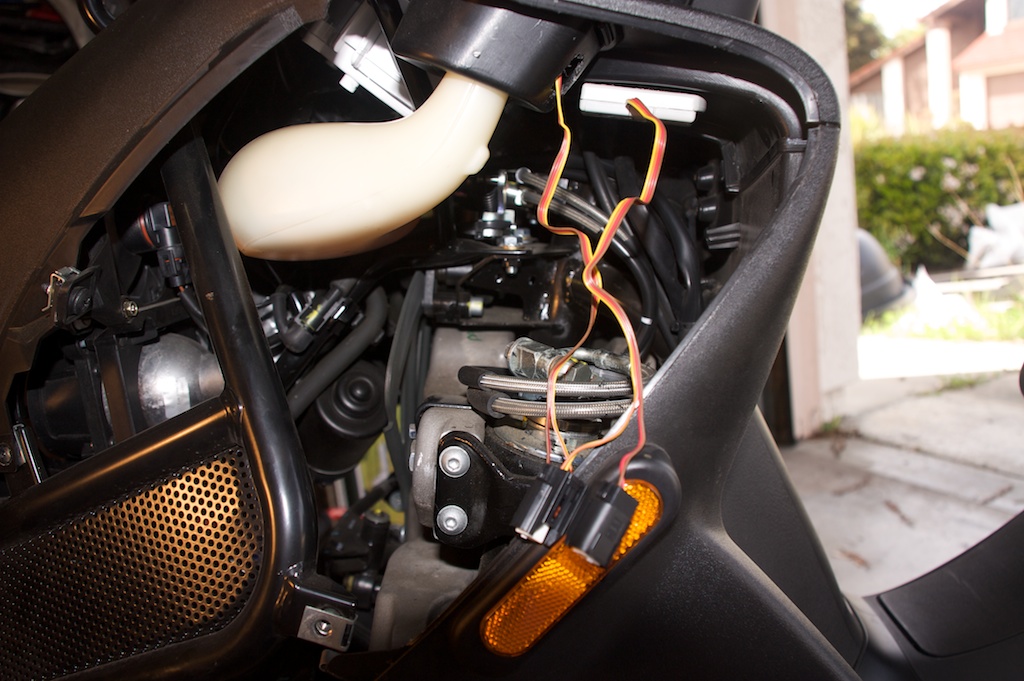
I examined the unit more closely and saw that it was held together with two nuts. I  disassembled the unit. This proved easier than I thought. Once I had the unit apart I decided that I wanted to do a clean mount into the dash. The fluid panel on the left side of the dash seemed the most likely place to install the unit. I removed the panel and drilled two 7/24 holes. Starting with a MUCH smaller bit and working my way up to not damage or oversize the hole.

After the holes were drilled I installed the trigger and the LED status light. There was a metal flange that holds the parts together. I reused this part and re-assembled the unit. The only problem I ran into, was that the thickness of the fluid cover was more than the metal holder it shipped with. I was unable to reuse the lock-washer because of the thickness.

The install appears to have come out nice and clean. My next challenge was where to mount the transmitter and how to route the wires. The pack was too large to store in the fluid container, so I decided I would mount it underneath. This would require cutting of the wires. I would be unable to drill a hole through the container large enough to put the pack through and I wanted a solution that would allow me to remove the transmitter (to change the battery) without having to disassemble the trigger and lights. (too many little parts to loose).

I searched for quick release connectors and found the following Molex connectors. http://www.mouser.com/molexminifith2O/ These looked to be perfect and are also waterproof. It took me a long time to find a vendor that carried them and would sell them in small quantities.With parts on order, I waited.

The parts finally arrived. The connectors were a bit bigger than I expected, but when I examined them, I saw how well made they were and decided to use them. I assembled the connectors. If you do not have a Molex tool for inserting the pins, you will need to completely disassemble the back of the connectors (removing the rubber gasket). This is not at all difficult, but just requires some patients and a light hand on the pliers to remove the plastic tabs.

Warning! Do not cut the wires with the receiver plugged in. It will trigger the remote and your garage door will go up or down, depending where it was. While working on the transmitter, it is best to unplug the receiver.

Now that I had the connectors attached and tested I set to the task of drilling a large enough opening. I started with a small bit and made many little cuts. This allows me to take my time and not over cut. Unfortunately, I had to make the opening a little larger than I wanted to because of the curve of the  basin. It was really difficult to cut straight, so it looks a little shabby. The first image below shows the opening from the inside, while the second shows from underneath. I plan to use a file and clean up the sharp edges later.

Once the hole was drilled I needed to find a decent place to mount the transmitter. There was a perfect flat spot up at the top. I decided to mount it there. I tried using the sticky tape that was provided with the unit but it just would not hold. I also tried to use contact cement and while it held very well to the plastic it would not adhere to the Velcro.

I gave up on that location (at least until I find a better adhesive. I tie-wrapped the wires and connectors to the wiring harness underneath so that it would be out of the way.

The above picture shows where I would like to eventually mount the transmitter, but until I address the adhesive issue, I have tie wrapped it to a solid piece of metal just in front of the hydraulics. I didn’t take a picture of that, sorry!

The only thing left to do at this point (besides the adhesive) is to get a rubber gasket and clean up the opening I drilled in the fluid overflow basin. Here is a photo of the finished project.

The entire cost of the project so far:

Remote $25
Connectors: $16

I expect the gasket to cost between $2 and $5 depending on where I find it.

March 3, 2010

Beware the Ides of March

Filed under: Things Peeves Would Do — Darkavich @ 10:47 am

I have been extremely lucky due to diligence and common sense when purchasing on the Internet. Today, I was going through my old receipts and discovered an order I had placed on March 14th 2009 that never arrived. I purchase a lot of items and it’s hard to keep track of what I bought and what has arrived. Having a checklist of things ordered really helps.

The company in question is called lidomounts.com and they appear to be a legitimate site that sells mounts for all sorts of vehicles. I had purchased a mount for a garmin nuvi for a motorcycle. Well it turns out this company is fraudulent. There appears to be a lot of postings about them, unfortunately it was all posted AFTER I made my purchase.

I looked online with my credit card company to dispute the charge. I was unable to find the charge on my statement so I called. There was no record of the charge. I got lucky… Apparently, their merchant account cut them off and my charge never went through.

I have tried to contact them to give them the benefit of the doubt, but nobody responded to voice mails or emails sent. The only real information I found was through the domain registration, but nobody at those numbers returns calls.

Registrant:
Lass Inc
4365 Farmdale Ave.
Studio City, CA 91604
US

Domain name: LIDOMOUNTS.COM

Administrative Contact:
Newcomb, Jim  lidomarketing@sbcglobal.net
4365 Farmdale Ave.
Studio City, CA 91604
US
+1.8187540292
Technical Contact:
Com, Web  info@web.com
6 Bethel Blvd.
Bethel, CT 06801
US
+1.2034482021    Fax: +1.2034482022

Older Posts »

Powered by WordPress